The Lab
Live Follow-Along Workshop

Build Your AI Reporting Agent

Turn your business performance data into a written update that explains what changed and what to do next.

Build alongside Rick Kranz as he guides you through creating your own reporting agent. You’ll connect your data, shape how it writes and work through its first draft together.

Leave with a fully operational agent you can run whenever you need an update, for your own business or across multiple businesses, without rebuilding it.

Led by Rick Kranz, co-founder and CEO of AI Marketing Labs, with more than 100 AI builds for businesses, inside our own operations, and alongside members in live Lab sessions over the past two years.

Save Your Seat

Free · October 21, 2026 · Noon ET

60 Mins · Live on Zoom

Can’t attend live? Register and we’ll send you the recording.

The Agent You’ll Build

Your agent will turn performance data into a written update you can review and use. It will explain important changes using the business context you provide and recommend where to focus next.

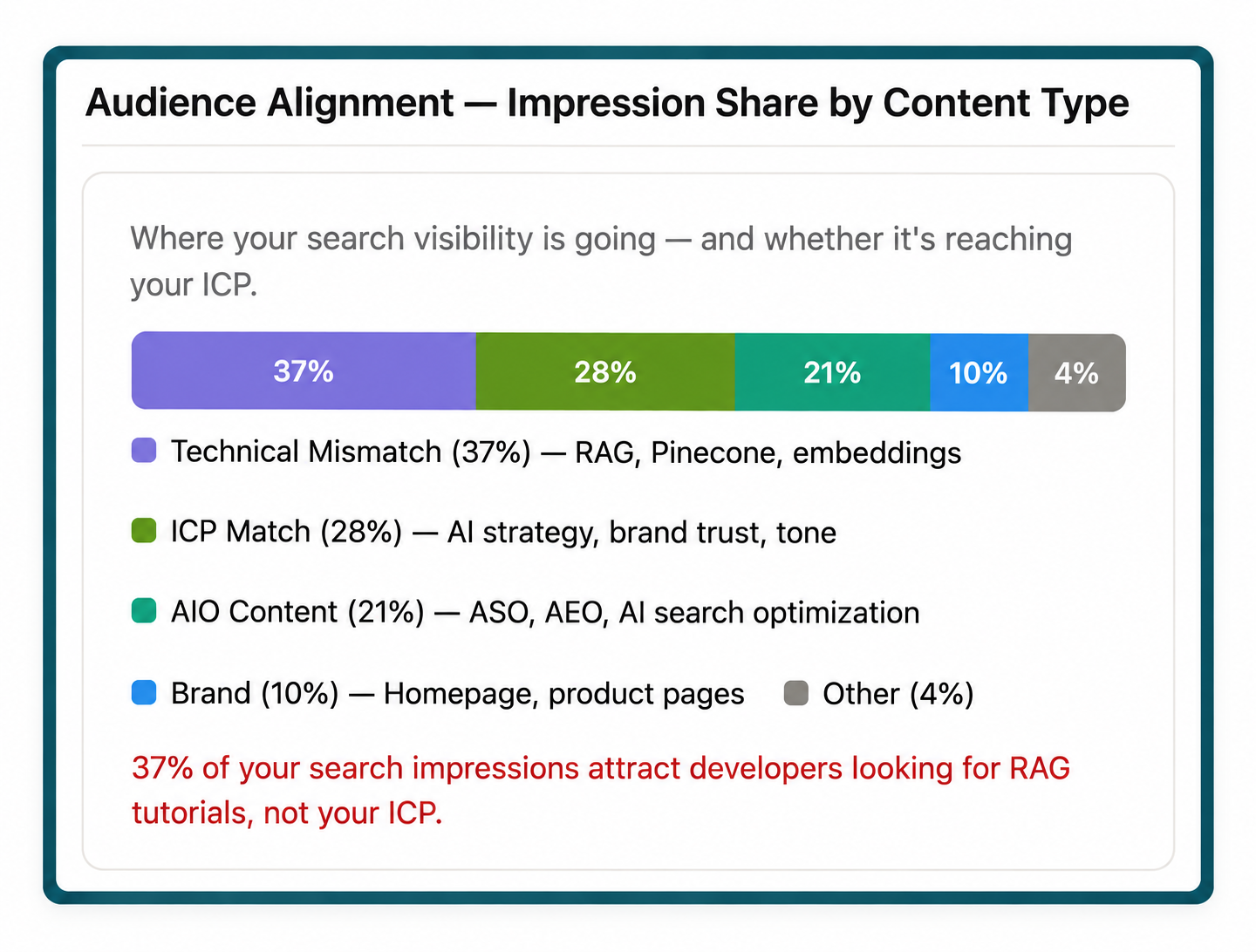
What changed, why it happened and what to do next.
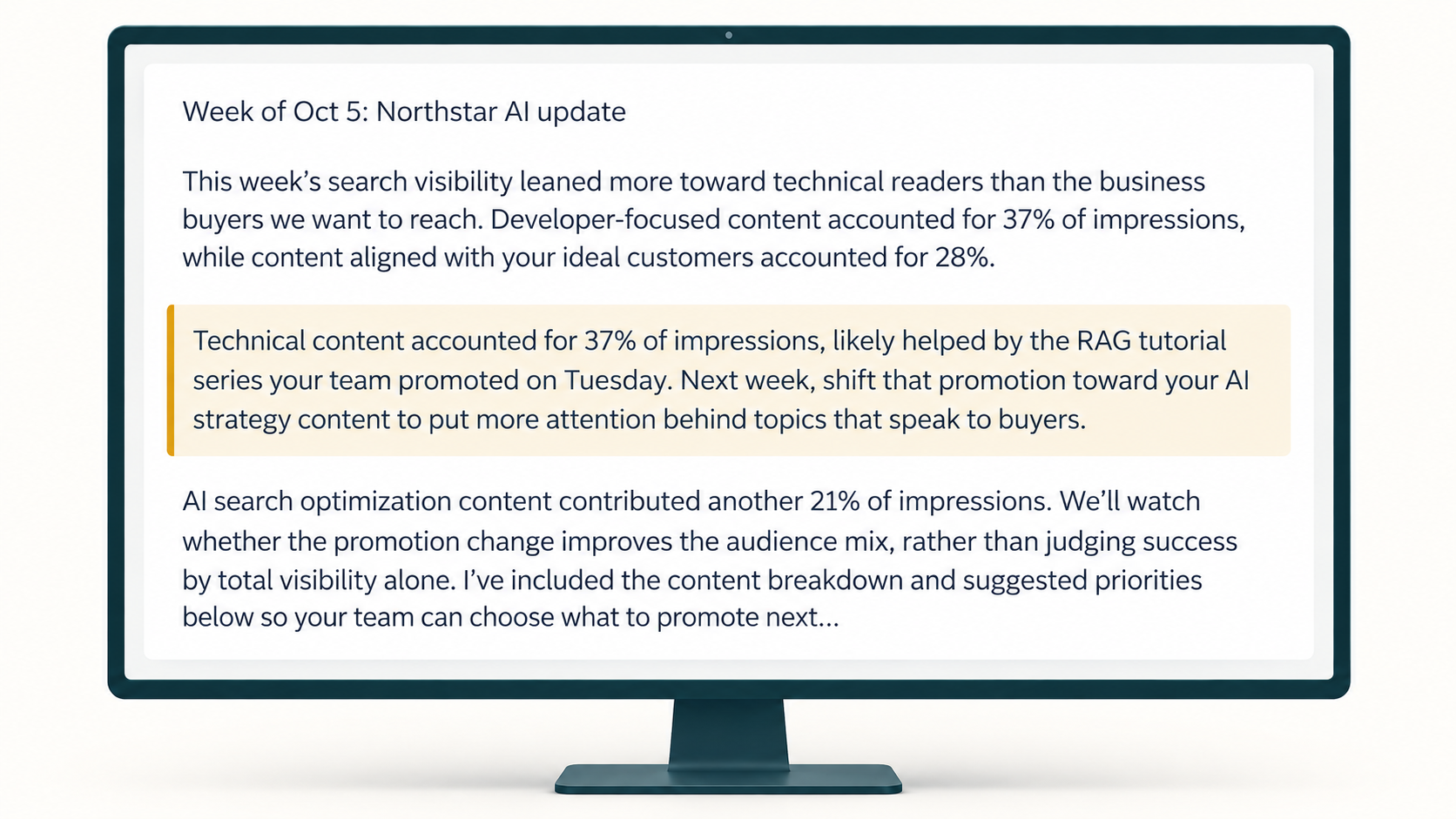
An example of the report your agent writes, using business data.
The business data behind the report.
  1. Stage 1

    Give Your Agent a Reporting Job

    Start by defining the update you need and connecting the performance data behind it. Rick will guide you through the instructions that tell your agent what to look for and how to write in your voice.

  2. Stage 2

    Run It and Work Through the Draft

    Run your agent and review what it produces. Together, we’ll work through the draft and adjust anything that needs more context or clearer direction. You’ll see how those decisions change the result.

  3. Stage 3

    Use It With Another Set of Data

    Once the agent is working, Rick will show you how to switch from Databox to a Google Sheet and run it with another business’s numbers. You’ll see how the same agent handles a different business without starting the build over.

Keep using your agent as the data changes, whether you’re preparing updates for your own business or reporting across multiple businesses.

Build Alongside Someone Who Does This Every Week

Rick Kranz, co-founder and CEO of AI Marketing Labs

Rick Kranz

Co-Founder and CEO, AI Marketing Labs

Over the past two years, Rick Kranz has completed more than 100 AI builds for businesses, inside AI Marketing Labs and alongside members in live Lab sessions.

He brings 30 years of experience running businesses in manufacturing and marketing to that work. That experience shapes the questions he asks before building: where the work gets stuck, what the system needs to handle, and whether the result will be useful to the people doing the job.

In this workshop, you’ll build alongside Rick as he explains those decisions and helps you get your reporting agent running.

Come Ready to Build

You’ll be building your own agent alongside Rick, so you need your tools and data ready before the session starts. We’ll use the hour to build and test your agent, which means your account setup and data connection need to be done beforehand.

Have everything listed here prepared before you join. Without the required setup and materials, you won’t be able to complete your agent during the workshop.

What You Need to Build Along

  • A paid Claude plan. Pro is enough.
  • Your performance data connected to Claude through HubSpot, Databox, or a Google Sheet.
  • An example update you’ve written for your own business or another business you work with.

  • A few lines of context: what the business is working toward and what changed recently.
  • Optional: Have a second business’s data ready if you’d like to test your agent across businesses during the final stage.

  • Download the setup guide and complete each step before the workshop so you’re ready to build.

Common questions

Am I building an agent or watching a demonstration?

You’ll build your own agent alongside Rick. Have your tools open and follow along as he guides you through the setup and first run.

Can I Use the Agent for More Than One Business?

Yes. You can use the same agent across multiple businesses and run it again as their data changes, without rebuilding it for each update.

What if I can’t attend live?

Register and we’ll send you the recording so you can work through the build afterward.